
Approve and Revoke are vital functions for securing your DApps assets! Improper configurations or neglecting them can result in significant financial losses. Recently, the OKX DEX Market-Maker smart contract experienced a security breach due to compromised management permissions. Users who had previously approved this contract address and failed to revoke it promptly, have suffered significant financial losses. For details, please refer to the following:
https://twitter.com/eno_eth/status/1734759709968945323
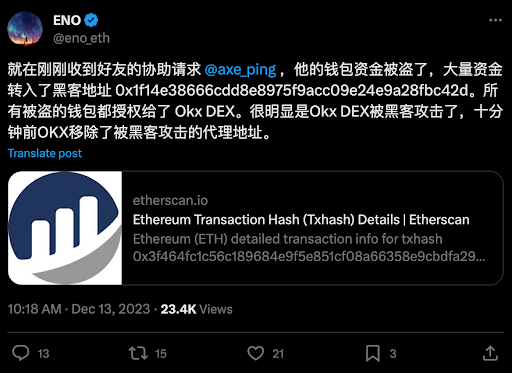
https://twitter.com/okxchinese/status/1734788314958581960

What is the Approve Function?
The Approve function is frequently triggered when using DApps based on Ethereum or other EVM-Compatible blockchains. This function allows smart contracts to transfer your tokens. However, some improper operations by users may lead to significant financial losses, such as granting approval to inappropriate or unknown spender addresses, setting unlimited approval amounts, or never revoking excess approved amounts after a transaction.
The Badger DAO hacking incident (refer to it here) underscored the significance of user diligence in verifying Spender addresses during the Approve function. This incident exploited user oversight and a frontend vulnerability in Badger DAO, resulting in the theft of over $120 million in user funds. In order to avoid such risks, Cactus Custody has established a trusted whitelist security feature for DApp interactions, including both Smart Contract addresses and Approved Spender addresses, to prevent unauthorized access to contracts and approvals to inappropriate addresses.
While official smart contracts do not imply absolute security, as highlighted in the beginning of the example of the OKX DEX. Only when users develop proper security practices can they maximize the assurance of asset safety.
How to Securely Use the Approve Function
Cactus Custody recommends adopting the following security guidelines as the first line of defense for your asset safety:
Limit Approval Amounts: Only approve the exact amount you intend to transact rather than approve an unlimited amount.
Revoke Immediately After Transactions: Once a transaction or interaction is completed, promptly revoke the token approvals and permissions.
Interact Trusted DApps Only: Only use the Approve function on trustworthy DApps. Refrain from approving operations induced by enticing methods such as airdrops from unfamiliar or small projects.
Regularly Review and Revoke: Periodically review your approvals to ensure they align with your transaction needs. Timely revoke any excess approval amounts for DApps you frequently use.
Terminating DApp Usage: If you cease using a particular DApp, check and revoke its authorization records immediately.
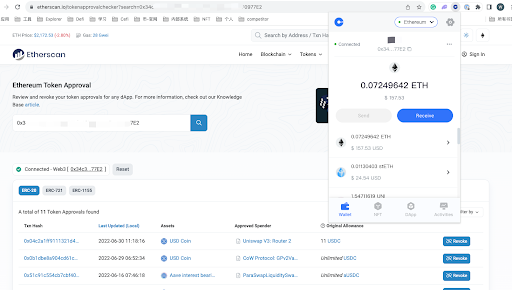
We recommend using the Etherscan Token Approval Checker tool for Approval checks and Revoke operations. For usage instructions, please refer to this guide. If you already have a Cactus Custody account, you can access this tool through Cactus Link to review your DeFi wallet’s Approve records.
Cactus Custody is dedicated to providing secure and compliant digital asset custody solutions. For the latest updates and security insights, please visit our website at https://blog.mycactus.com/.